
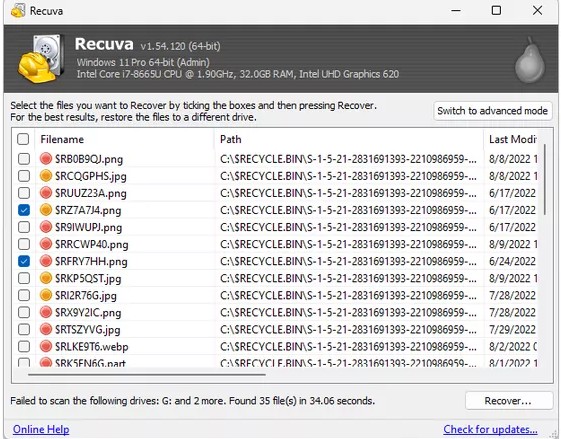
Windows keeps different amounts of “memory” about a delete depending on how the file left the system. A file sitting in the Recycle Bin is intentionally reversible. A shift-delete bypasses that holding area, which pushes you faster toward scenarios where only carving or backups can help. Quick scan is not magic—but it is often surprisingly good when metadata is still fresh.
This article walks through the common patterns: emptied Bin versus shift-delete, what quick scan tends to show in each case, and the background churn (updates, installers, indexing) that silently narrows your recovery margin.
Recycle Bin deletes: why quick scan often works
When the Bin still holds—or recently held—the file, the OS often retains enough directory information that a quick scan returns plausible paths and names quickly. That speed matters because it lets you recover earlier in the incident timeline, before optional maintenance tasks add new writes.
If the user emptied the Bin “yesterday” versus “last year” is not the same risk profile. Treat time as a first-class variable: the longer ago the delete, the more you should assume other activity has reused clusters, especially on busy system disks.
Shift-delete and busy disks: when to escalate sooner
Shift-delete does not mean “unrecoverable instantly,” but it does mean you skipped the safety rail. Combine that with torrent clients, game launchers, dev builds writing to the user profile, and automatic cloud sync, and the filesystem’s helpful metadata can evaporate faster than people expect.
- If quick scan returns nothing and the delete was recent, pause large downloads and rescan after quieting the machine.
- If you see candidates but paths look wrong, sort by size and modified time before exporting everything.
- If the machine is a shared family PC, ask what else happened the same afternoon—updates matter.
A calm “first hour” playbook
Document what you know: original path, filename pattern, approximate size, and file type. Then pick a recovery destination with free space and stable connectivity. Run quick scan first, export a small test set, open files in the real application, and only then widen the net. Panic-driven mass exports are how people turn a recoverable situation into an overwritten one.
When to stop pushing DIY
If the disk is physically unhealthy, if the data is regulated, or if the timeline is unforgiving, escalate to the right tier: IT restore, cloud admin tools, or a recovery lab. Consumer guides cannot replace an incident response plan—but they can help you avoid the worst self-inflicted mistakes in the opening hour.